Heartmony: Feel the Music

Heartmony: Feel the Music

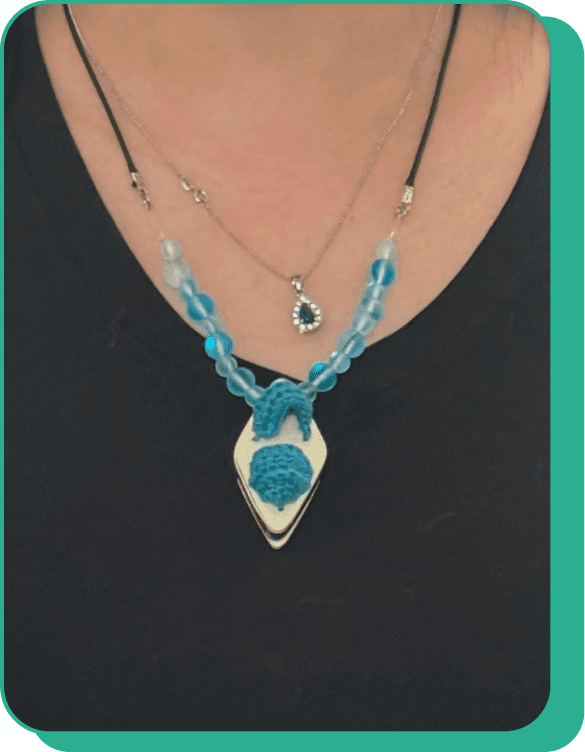
Heartmony: is a haptic pendant designed to let users feel music through touch, transforming sound into vibrations for a deeply immersive and emotional connection to music

Client

Neruda Arts

Project Type

Academic

Year

Sep - Dec 2024
Siyao Xu
Lead Designer
Xioyu Xu
UI/UI Designer

Kanika Varma
Kanika Varma
Project Lead
Jerome Huang
UI/UI Designer

Our vision is to create an inclusive space where everyone feels welcome and can meaningfully engage with music.

Neruda Arts, a cultural hub in St. Jacobs, Ontario, hosts annual live concerts featuring performers from around the globe, striving to bring diverse arts and culture to the community. However, they’ve recognized that an important segment of the audience—those who are hard of hearing or Deaf—have been left out of the experience.


Neruda Arts, a cultural hub in St. Jacobs, Ontario, hosts annual live concerts featuring performers from around the globe, striving to bring diverse arts and culture to the community. However, they’ve recognized that an important segment of the audience—those who are hard of hearing or Deaf—have been left out of the experience.

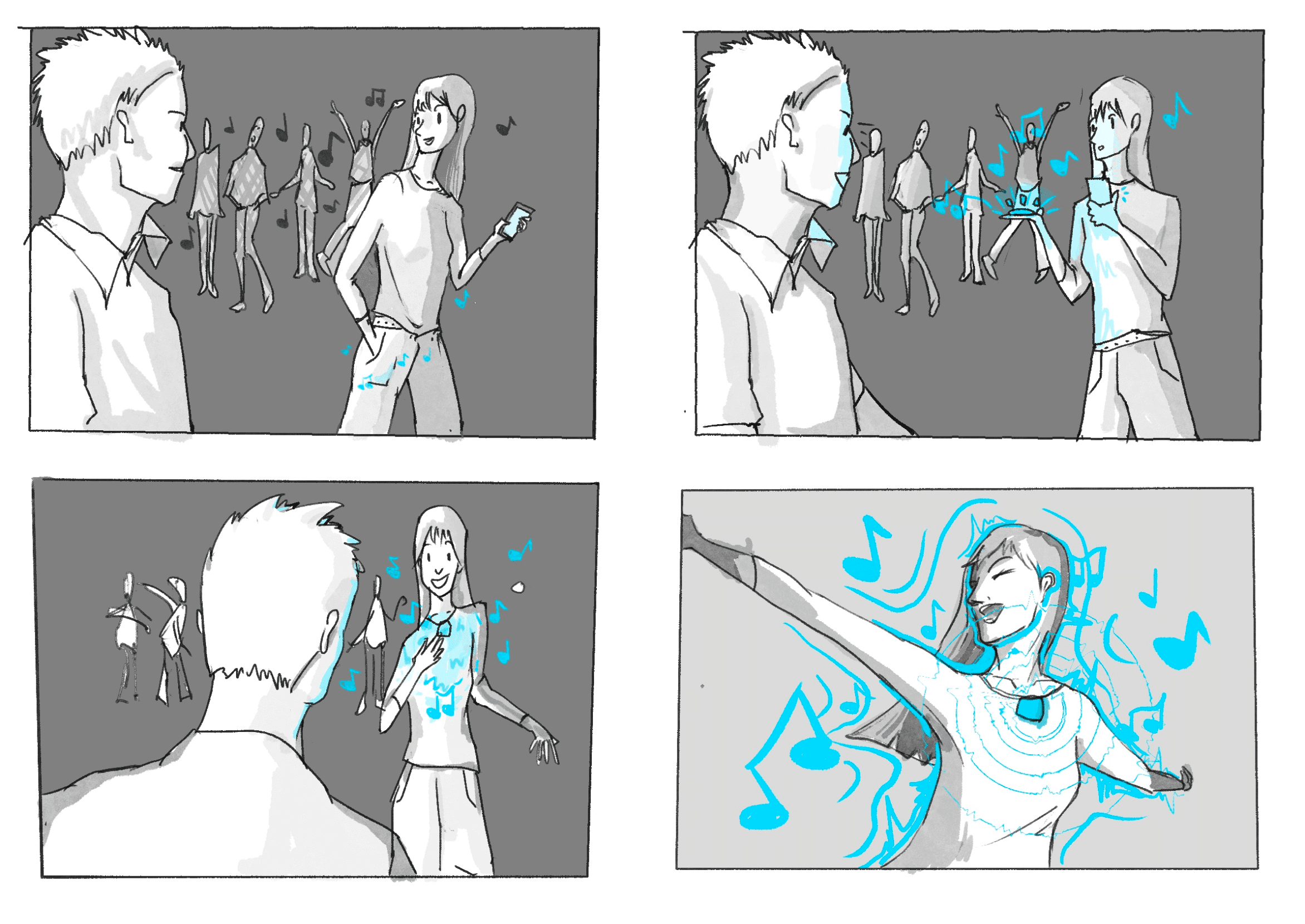
Meet Amani

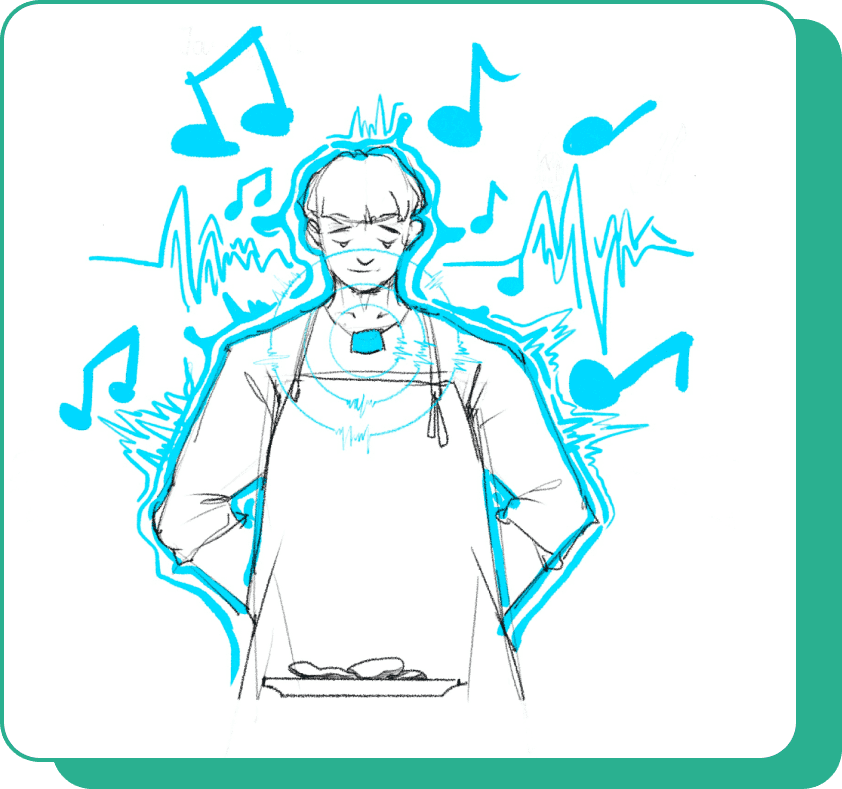
After experiencing partial hearing loss from an accident, she now wears Heartmony’s haptic pendant. At the concert, she’s immersed in the rhythm, dancing freely as the haptic feedback connects her to the music.
Ideation & User Testing

We user tested and performed research tasks between each iteration to ensure a truly user-lead design.

We user tested and performed research tasks between each iteration to ensure a truly user-lead design.

Design Phase

Neruda Arts' noble vision of designing for everyone presents a challenge, as it involves balancing conflicting priorities.

Neruda Arts' noble vision of designing for everyone presents a challenge, as it involves balancing conflicting priorities.

Our first step was to gather all relevant information and segment it into distinct user groups. We developed personas, mapped user journeys, and conducted an extensive literature review to explore existing haptic solutions, understand the anatomy of human hearing, and gain insights into our users' lived experiences. Given the sensitive nature of our user group, we prioritized thorough research and due diligence to ensure their perspectives were deeply understood and accurately represented.


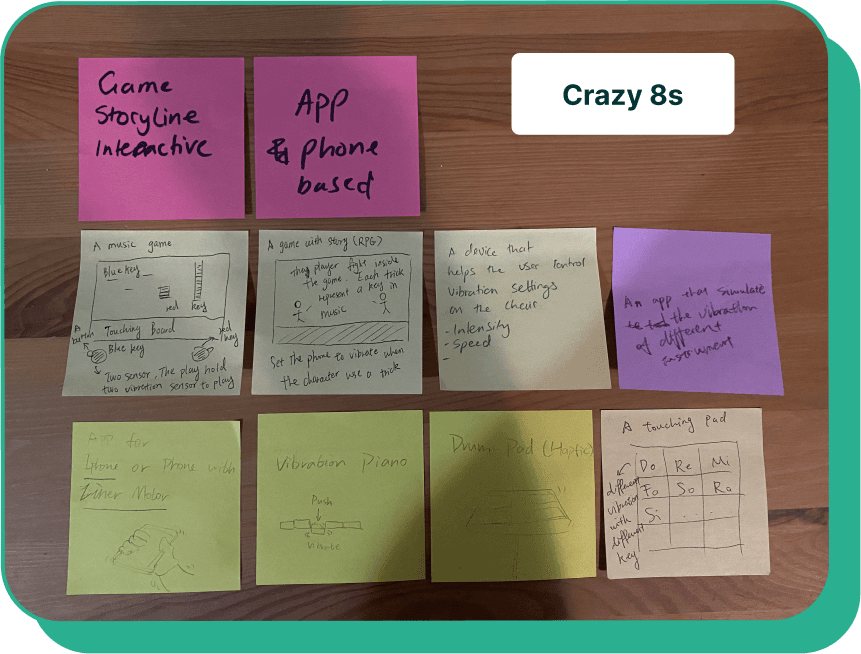
Through a crazy eight’s exercise, we identified key themes from our research, with each team member focusing on a different aspect of the problem. We grouped our "idea sketches" under these themes and used a checklist of user goals (outlined below) to select the theme to prioritize.

Our first step was to gather all relevant information and segment it into distinct user groups. We developed personas, mapped user journeys, and conducted an extensive literature review to explore existing haptic solutions, understand the anatomy of human hearing, and gain insights into our users' lived experiences. Given the sensitive nature of our user group, we prioritized thorough research and due diligence to ensure their perspectives were deeply understood and accurately represented.


Through a crazy eight’s exercise, we identified key themes from our research, with each team member focusing on a different aspect of the problem. We grouped our "idea sketches" under these themes and used a checklist of user goals (outlined below) to select the theme to prioritize.

Haptic Handheld Device & Accessory

Haptic Handheld Device & Accessory

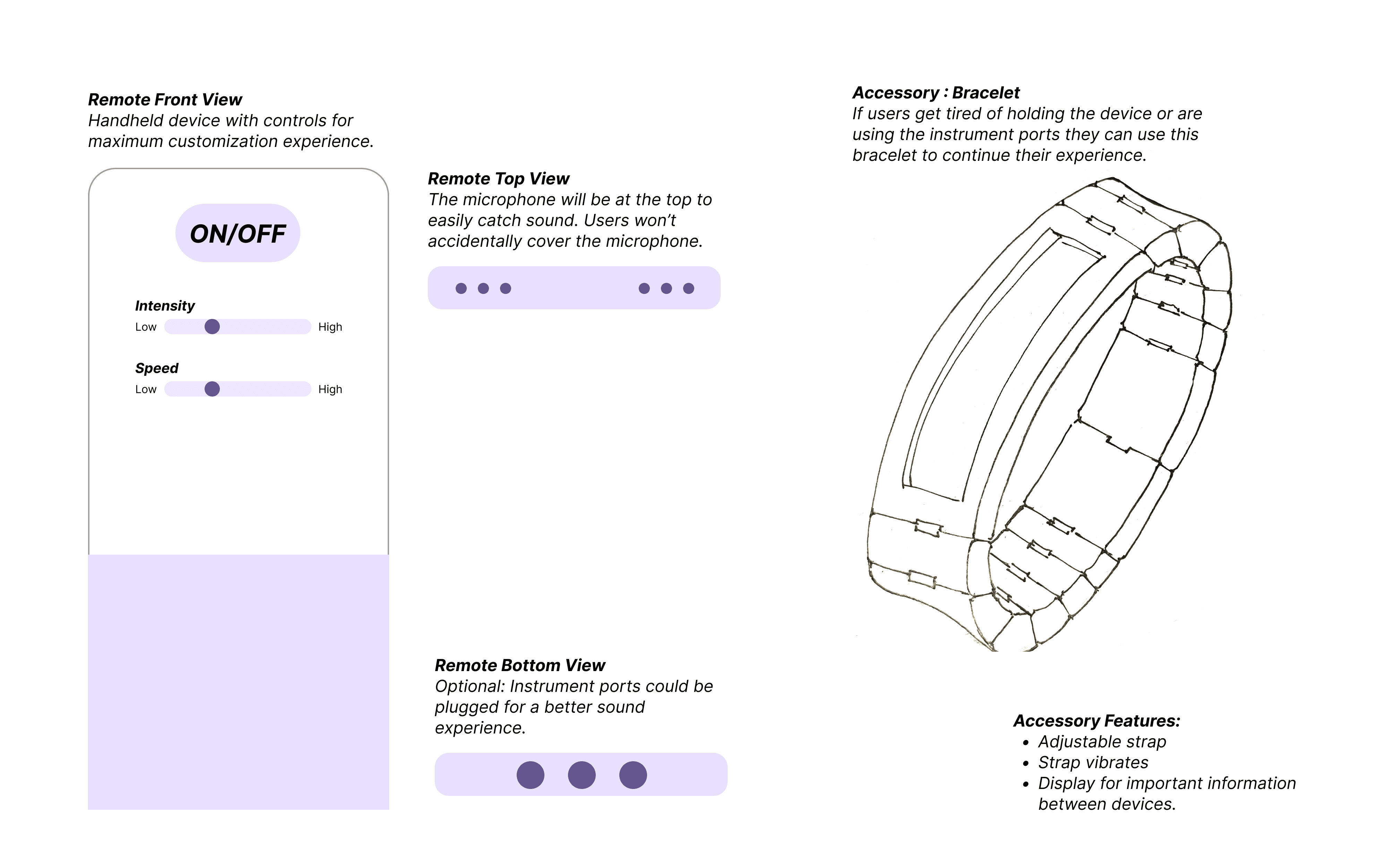
We designed a microphone/remote device for users to hold during concerts. This device captures live audio and translates it into haptic feedback. It’s soft and ergonomic back conforms to the user’s hand for maximum surface contact. For a more immersive experience, users can pair the remote with an optional haptic accessory, such as a bracelet.

We designed a microphone/remote device for users to hold during concerts. This device captures live audio and translates it into haptic feedback. It’s soft and ergonomic back conforms to the user’s hand for maximum surface contact. For a more immersive experience, users can pair the remote with an optional haptic accessory, such as a bracelet.

Insight & Feedback
User Insight
Design Decision
User Feedback

A device that can be used in concerts/ on the go.

Handheld device directly for catching live performances.

Microphone should collect accurate feedback.

Small and discreet to avoid unnecessary attention.

Once the device is not in use, it can be held, put into pocket or kept on their lap.

Prefer flexibility to wear the haptic device.

Easy to use by users 40 and older.

Create a design resembling familiar tools like TV remotes.

They were happy with the design, especially the curved back.

Does not distract the user from the concert experience, low interaction.

We avoided a digital product to eliminate distractions & concerns about battery life.

Holding the device throughout a concert could be distracting/ tiring.

Design Phase
Haptic Accessory & App

Haptic Accessory & App

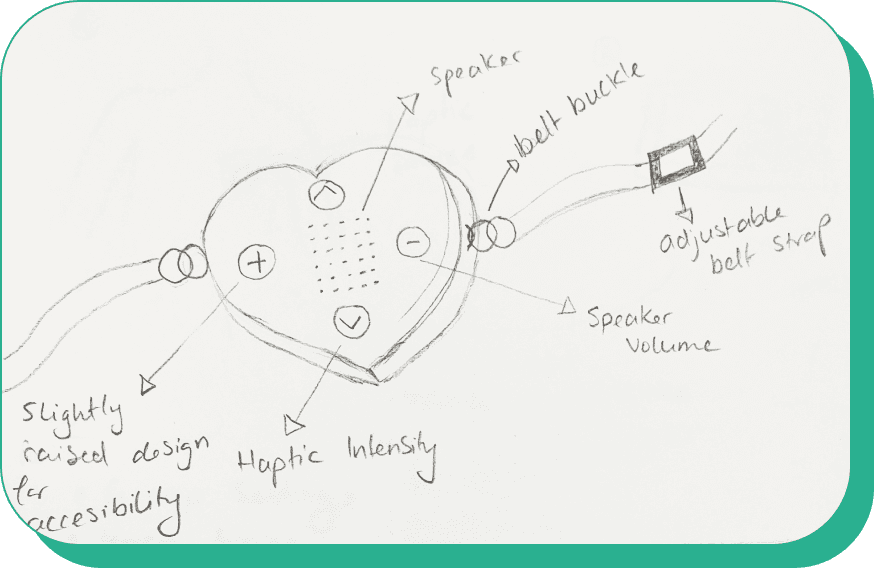
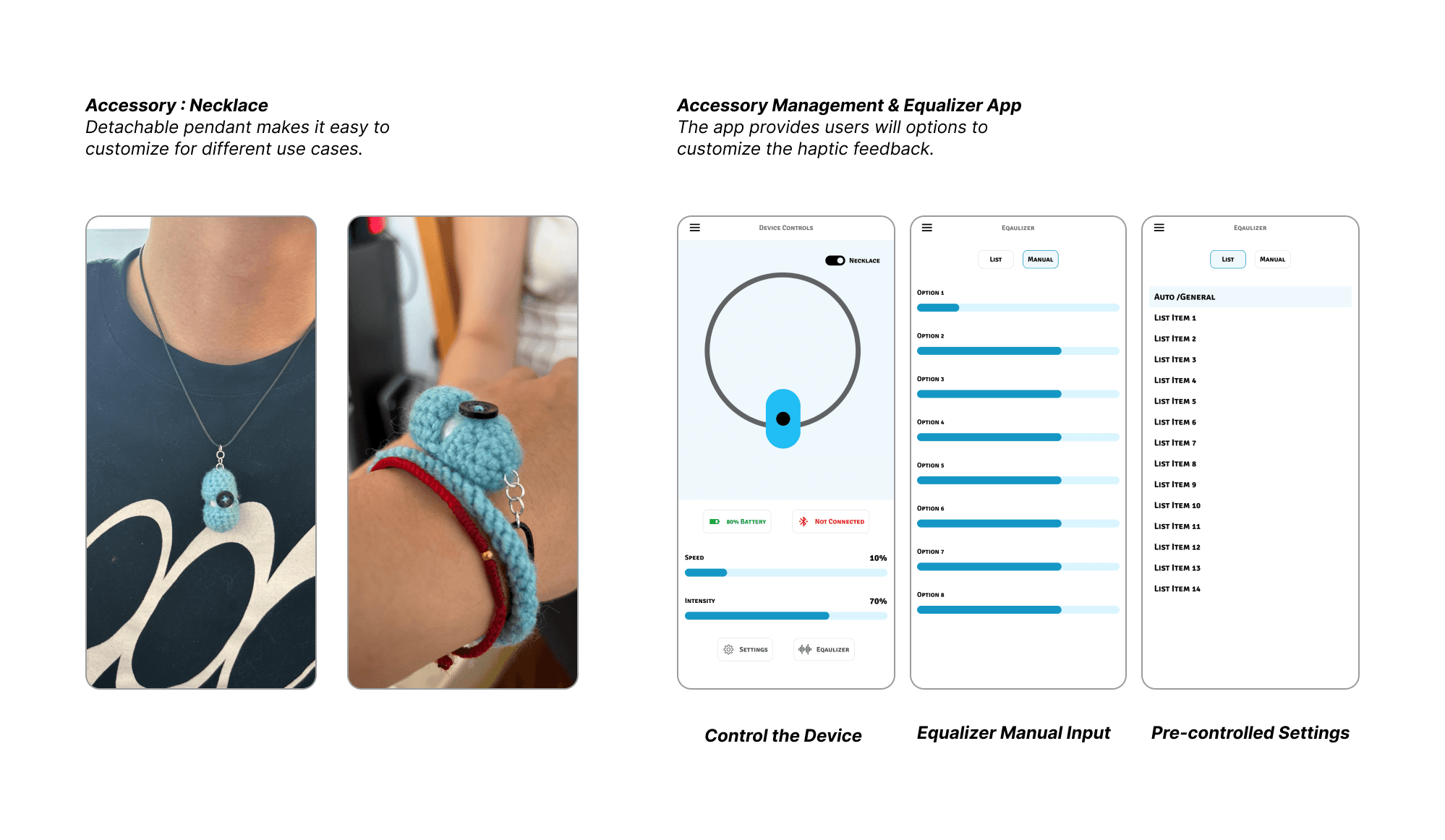
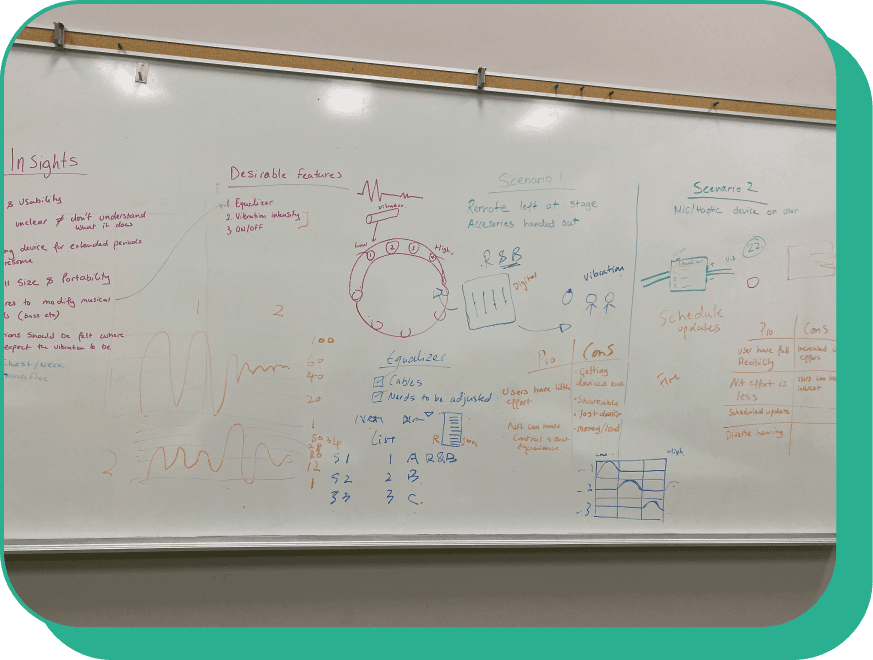
Taking into account the user feedback we decided to focus on delivering the highest quality music information while offering users customization options. We revisited our sketches and designed an app that Neruda Arts can install on any device. The device would be placed on stage and connected to their audio mixer. The app will link to haptic accessories distributed to concert attendees. Neruda Arts can optimize the equalizer settings through the app, either using our pre-set configurations or adjusting them manually. This ensures that high frequencies can be adjusted to lower levels for haptic devices, enabling hearing-impaired users to fully engage with the performance.

With these accessories, users can enjoy a curated concert experience tailored to their needs. And they don’t have to do anything!

Taking into account the user feedback we decided to focus on delivering the highest quality music information while offering users customization options. We revisited our sketches and designed an app that Neruda Arts can install on any device. The device would be placed on stage and connected to their audio mixer. The app will link to haptic accessories distributed to concert attendees. Neruda Arts can optimize the equalizer settings through the app, either using our pre-set configurations or adjusting them manually. This ensures that high frequencies can be adjusted to lower levels for haptic devices, enabling hearing-impaired users to fully engage with the performance.

With these accessories, users can enjoy a curated concert experience tailored to their needs. And they don’t have to do anything!

Insight & Feedback
User Insight
Design Decision
User Feedback

Accurate sound and haptic feedback

Utilize their existing technology, design a digital bridge for our device.

This looks good!

Users have full freedom to enjoy the concert i.e dance, clap, drink etc.

A wearable accessory like a necklace or bracelet

The pendant sits on top of the clothing, haptic feedback is not felt as strongly.

A design that fits the concert experience.

Owned and controlled by the client, distributed and synced to live performances.

The design is still a little bulky!

Sound customization.

Connect the mixer to our accessories will ensure a customized experience for users.

Excellent! It follows the existing conventions.
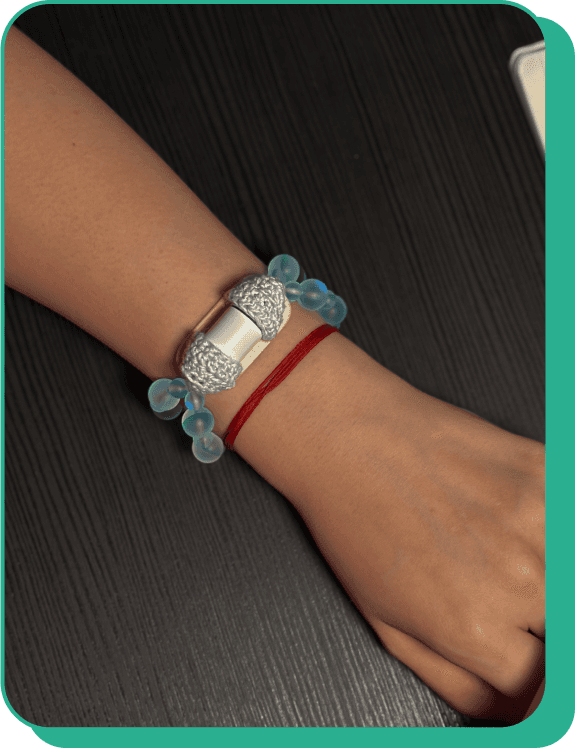
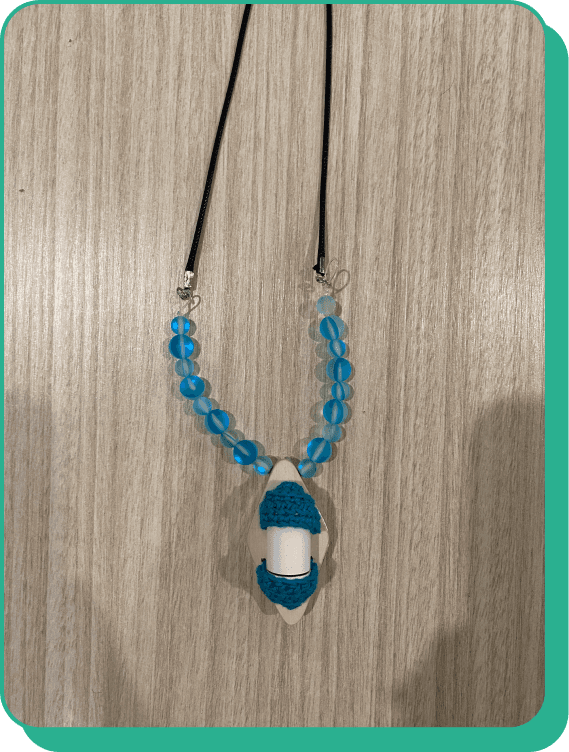
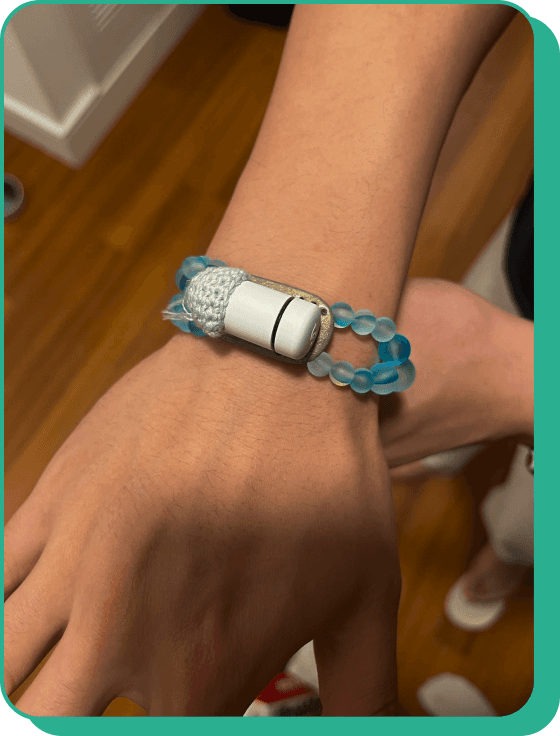
Final Iteration - Designed for effortless use—just put it on, and you’re ready to dance!

Final Iteration - Designed for effortless use—just put it on, and you’re ready to dance!

Featuring plastic bead straps that optimize vibration technology and a wooden base that enhances comfort and haptic sensations, it combines functionality with tactile appeal. Fully customizable for all users, it’s easy to wear, easy to remove, and crafted for both performance and enjoyment.

Featuring plastic bead straps that optimize vibration technology and a wooden base that enhances comfort and haptic sensations, it combines functionality with tactile appeal. Fully customizable for all users, it’s easy to wear, easy to remove, and crafted for both performance and enjoyment.

Haptic Technology

Haptic Technology

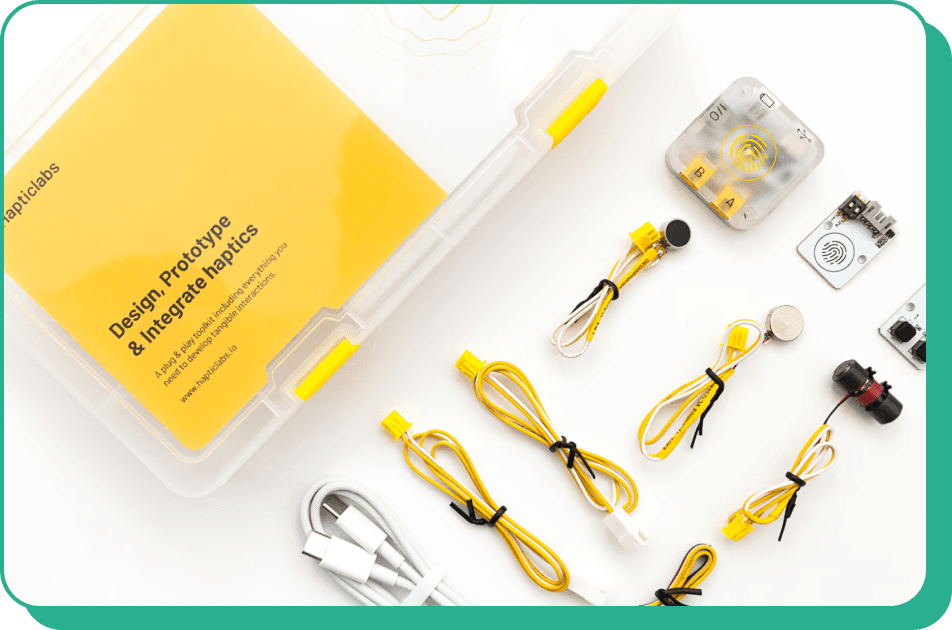
We incorporated two types of devices to simulate haptic sensations in our prototype. The first, shown in the photo, is a vibration device that uses oscillatory motion. This device features a small motor with an off-center weight that rotates rapidly, generating a steady, rhythmic vibration. The intensity of the vibrations can vary from soft and subtle to strong and powerful, depending on the motor's speed and strength. We selected this device due to its compact size (approximately 4 cm by 2 cm), portability, battery-powered operation, and sleek, unobtrusive design.

However, we needed a device capable of more precisely replicating the technology we envisioned. It was essential for the vibrations to adapt dynamically to frequency and convey detailed information such as rhythm, beat, and melody.

We incorporated two types of devices to simulate haptic sensations in our prototype. The first, shown in the photo, is a vibration device that uses oscillatory motion. This device features a small motor with an off-center weight that rotates rapidly, generating a steady, rhythmic vibration. The intensity of the vibrations can vary from soft and subtle to strong and powerful, depending on the motor's speed and strength. We selected this device due to its compact size (approximately 4 cm by 2 cm), portability, battery-powered operation, and sleek, unobtrusive design.

However, we needed a device capable of more precisely replicating the technology we envisioned. It was essential for the vibrations to adapt dynamically to frequency and convey detailed information such as rhythm, beat, and melody.

Hapticlabs offers a comprehensive no-code toolkit designed to simplify the creation of haptic interactions. Their flagship software, Hapticlabs Studio, enables users to design custom haptic patterns and signals without any coding. This software integrates seamlessly with their hardware DevKit and Mobile App, allowing for real-time evaluation of designs across various devices. The DevKit facilitates the augmentation of objects with haptic feedback, while the Mobile App provides tangible feedback on iOS devices. This ecosystem streamlines the prototyping, evaluation, and deployment of haptic experiences, making it accessible for users to develop immersive interactions efficiently.

Hapticlabs offers a comprehensive no-code toolkit designed to simplify the creation of haptic interactions. Their flagship software, Hapticlabs Studio, enables users to design custom haptic patterns and signals without any coding. This software integrates seamlessly with their hardware DevKit and Mobile App, allowing for real-time evaluation of designs across various devices. The DevKit facilitates the augmentation of objects with haptic feedback, while the Mobile App provides tangible feedback on iOS devices. This ecosystem streamlines the prototyping, evaluation, and deployment of haptic experiences, making it accessible for users to develop immersive interactions efficiently.

We used the Hapticlabs kit to create a custom haptic sequence for a Christmas song. Using Hapticlab’s no-code toolkit, we designed and refined haptic patterns that matched the rhythm and melody of the song. With the DevKit, we integrated these patterns into the hardware to deliver a tactile experience, and the Mobile App allowed us to test and adjust the sequence in real-time. This project gave us a hands-on opportunity to explore how haptic technology can enhance the way we experience music through touch.

We used the Hapticlabs kit to create a custom haptic sequence for a Christmas song. Using Hapticlab’s no-code toolkit, we designed and refined haptic patterns that matched the rhythm and melody of the song. With the DevKit, we integrated these patterns into the hardware to deliver a tactile experience, and the Mobile App allowed us to test and adjust the sequence in real-time. This project gave us a hands-on opportunity to explore how haptic technology can enhance the way we experience music through touch.

Final Iteration - App Prototype

Final Iteration - App Prototype

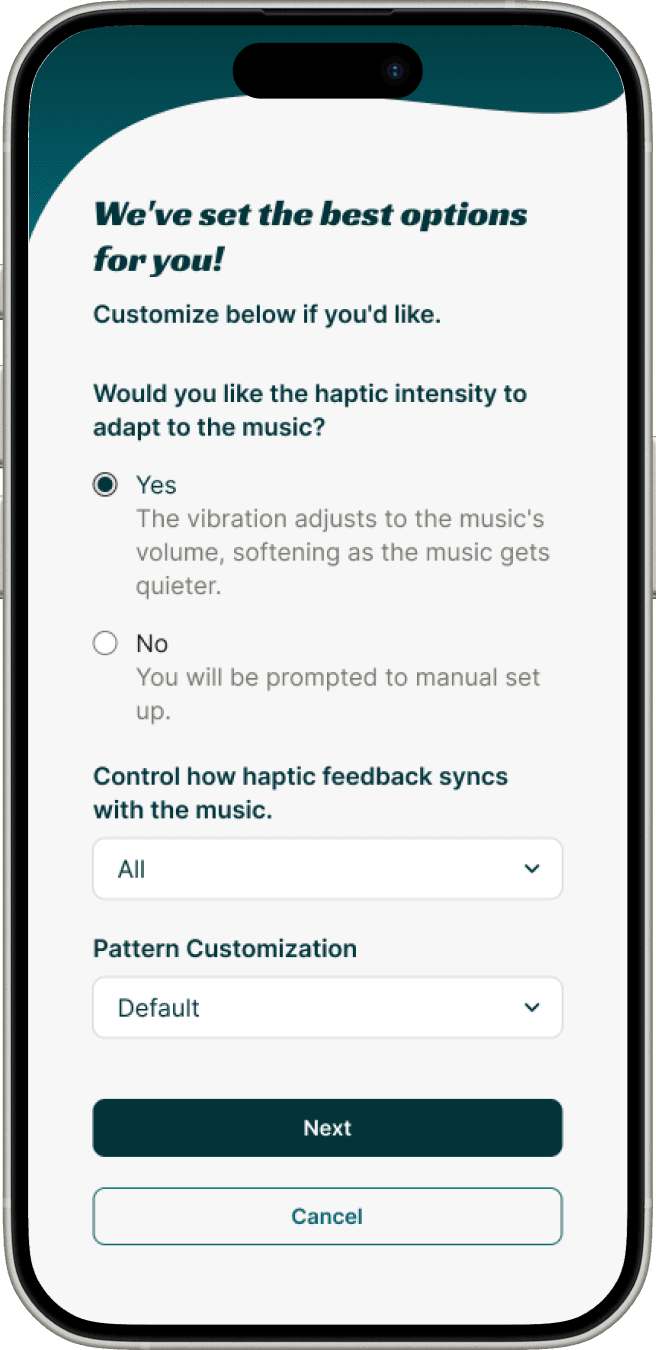
After previous feedback we realized users are unlikely to have background knowledge or interest to customize the device experience. And in order for this device to be successful with all user groups ( children and elderly) we needed to reduce the barrier of entry even further. After some research we looked into the design experience of concert bracelets, they use LED technology and light up at different points during a concert, synced to the performance and controlled by the event organizers. We realized we could aim for something similar, a hands-free & mind free, synchronized concert experience.

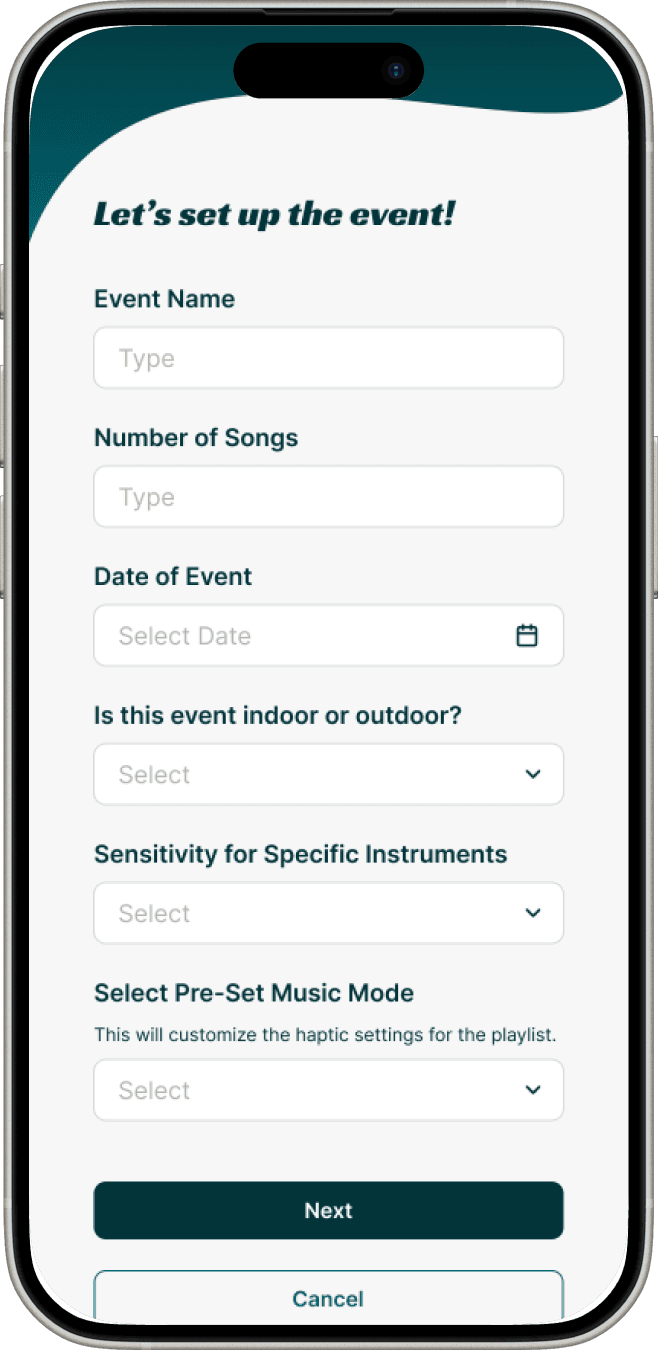
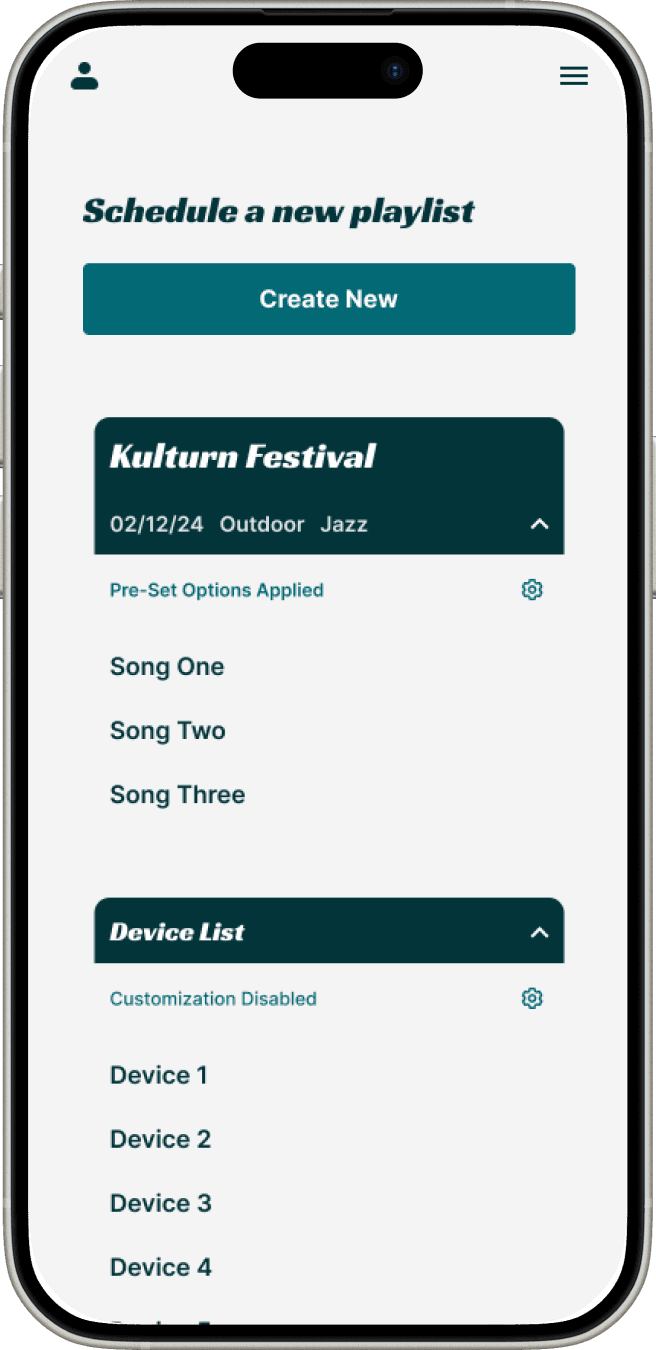
Neruda Arts will download the app, set up a playlist for there concert, add custom settings and hit play when the concert begins. The mobile device can be connected with additional technology to the mixer, or can be manually set up using the form below.

After previous feedback we realized users are unlikely to have background knowledge or interest to customize the device experience. And in order for this device to be successful with all user groups ( children and elderly) we needed to reduce the barrier of entry even further. After some research we looked into the design experience of concert bracelets, they use LED technology and light up at different points during a concert, synced to the performance and controlled by the event organizers. We realized we could aim for something similar, a hands-free & mind free, synchronized concert experience.

Neruda Arts will download the app, set up a playlist for there concert, add custom settings and hit play when the concert begins. The mobile device can be connected with additional technology to the mixer, or can be manually set up using the form below.

Haptic Settings

Step Two is to set up the haptic settings, if they want the vibration to adapt dynamically to the concert and how they want the feedback to respond (pattern & intensity).
Microphone Settings

Step One is to fill out basic event information to identify each playlist. Set the microphone sensitivity (noise, instruments and genre)
Dashboard

Step Four check the dashboard for the completed playlist. Access and play when ready.
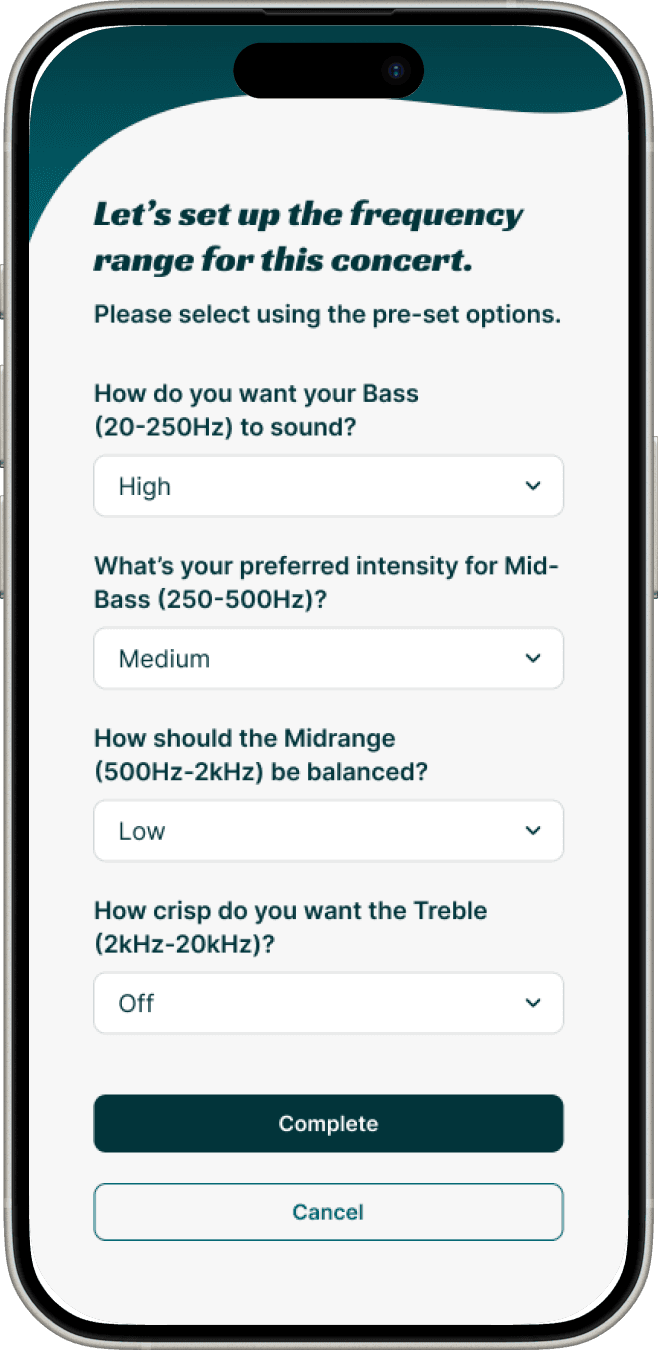
Frequency Settings (Equalizer)

Step Three is to set up the frequency feedback. This will add some structure to the vibration feedback i.e all low frequency sounds between 20 - 250hz will have the highest intensity.
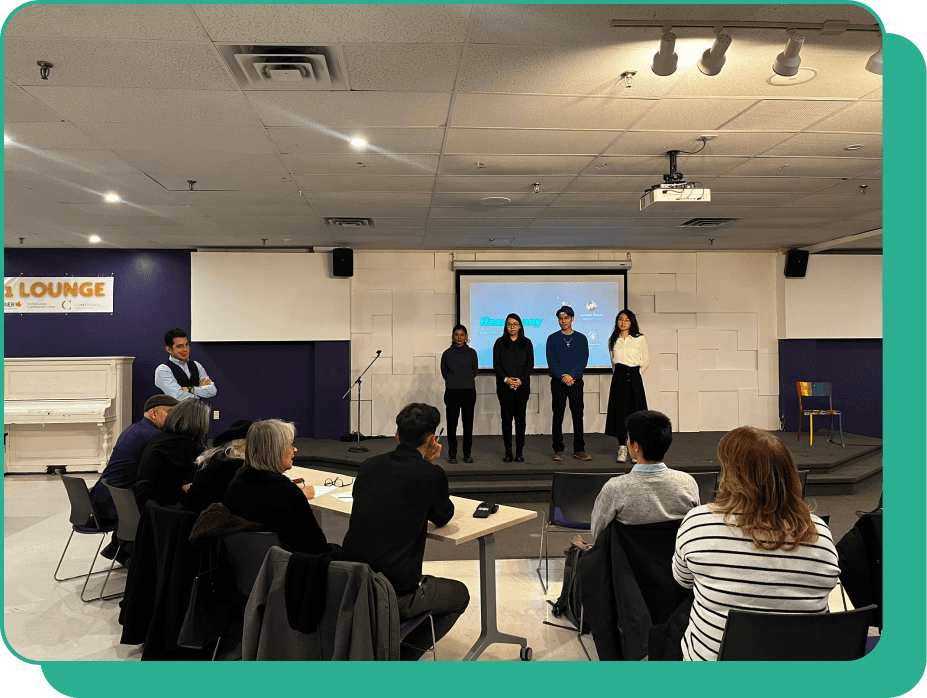
Enhance user experience by improving vibration feedback, refining the necklace design, expanding app functionality for all devices, and enabling song-specific haptic customization for greater personalization.

To enhance the user experience, we plan to incorporate stronger vibrations and improve sensitivity to better reflect the movement and dynamics of a song, ensuring more precise and responsive feedback. The design will be refined by creating a smaller, sleeker necklace to address its current bulkiness and adding more weight to the pendant so it sits securely on the skin, enhancing the intensity of vibrations. We also aim to expand the app’s functionality by making it fully responsive across all devices, including tablets and desktops. Additionally, we will move beyond playlist-based settings to allow for individual song customization, offering users greater personalization of their haptic feedback. By addressing these areas, we strive to create a more versatile, user-friendly, and immersive device.

To enhance the user experience, we plan to incorporate stronger vibrations and improve sensitivity to better reflect the movement and dynamics of a song, ensuring more precise and responsive feedback. The design will be refined by creating a smaller, sleeker necklace to address its current bulkiness and adding more weight to the pendant so it sits securely on the skin, enhancing the intensity of vibrations. We also aim to expand the app’s functionality by making it fully responsive across all devices, including tablets and desktops. Additionally, we will move beyond playlist-based settings to allow for individual song customization, offering users greater personalization of their haptic feedback. By addressing these areas, we strive to create a more versatile, user-friendly, and immersive device.

The product, designed with sustainable materials and cultural relevance, is affordable, scalable, and comfortable for both hearing and hard-of-hearing users, fostering inclusivity while allowing iterative updates for evolving haptic technology.

The product, designed with sustainable materials and cultural relevance, is affordable, scalable, and comfortable for both hearing and hard-of-hearing users, fostering inclusivity while allowing iterative updates for evolving haptic technology.

By using easily sourced materials like yarn and wood, the product is both mass-producible and scalable. The majority of the cost is allocated to the haptic technology kits, making the chosen materials not only affordable but also sustainable—aligning with Neruda Arts' core value of doing more good than harm. Cultural relevance was a key consideration in the design process, resulting in a product that blends seamlessly with concert environments and aligns with users' mental models of appropriate concert attire. This ensures that individuals who are hard of hearing feel comfortable wearing the device, while also appealing to hearing users who can enjoy the technology for fun, fostering a connection between the two communities. Additionally, the design emphasizes long-term sustainability through its simplicity, allowing elements like size and shape to be iteratively updated to remain compatible with evolving haptic technology used by Neruda Arts.

By using easily sourced materials like yarn and wood, the product is both mass-producible and scalable. The majority of the cost is allocated to the haptic technology kits, making the chosen materials not only affordable but also sustainable—aligning with Neruda Arts' core value of doing more good than harm. Cultural relevance was a key consideration in the design process, resulting in a product that blends seamlessly with concert environments and aligns with users' mental models of appropriate concert attire. This ensures that individuals who are hard of hearing feel comfortable wearing the device, while also appealing to hearing users who can enjoy the technology for fun, fostering a connection between the two communities. Additionally, the design emphasizes long-term sustainability through its simplicity, allowing elements like size and shape to be iteratively updated to remain compatible with evolving haptic technology used by Neruda Arts.

Create a free website with Framer, the website builder loved by startups, designers and agencies.